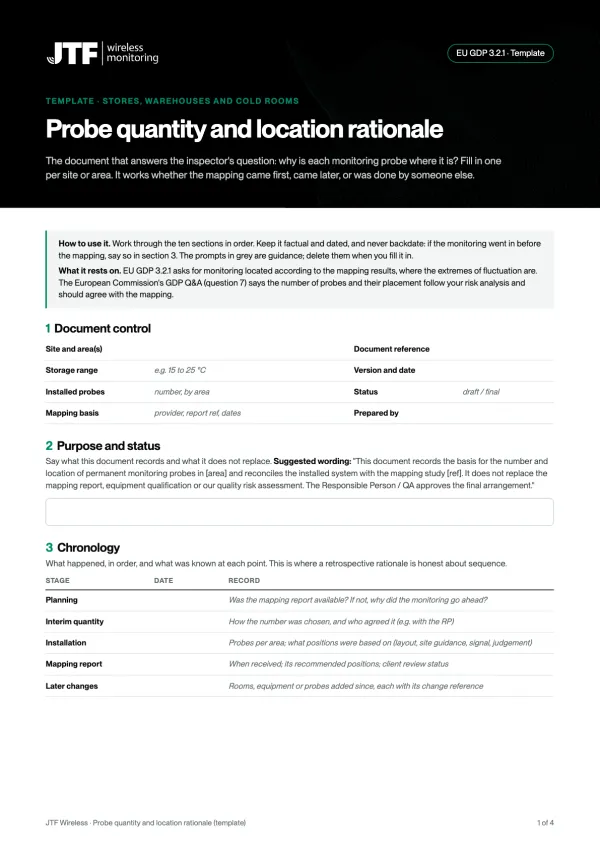
If an inspector asks why a monitoring probe is where it is, the answer should be one line in a controlled document: this probe covers the hot spot the mapping study found here, at this height, and the Responsible Person approved it. When monitoring went in before the mapping, or the mapping was never checked against the monitoring, that line is missing. This guide shows how to write it, with a worked example and a free template.
Why the question comes up
The rule is one sentence, and inspectors test it
EU GDP 3.2.1 says temperature monitoring equipment should be located according to the results of the mapping exercise, so that monitoring devices sit in the areas that experience the extremes of fluctuation. Section 9.4 asks for mapping of temperature-controlled vehicles too, taking account of seasonal variations. The European Commission's GDP Q&A (question 7) adds that the number of probes and their placement depend on your risk analysis and should agree with the mapping results.
The MHRA reads it the same way. Its mapping blog says your risk assessment should determine the most appropriate positions for the permanent probes, and that the RP should be party to the whole mapping process. The 2016 GDP deficiency data cite a site where mapping had not been done well enough to place the thermometers in the areas with the extremes of fluctuation.
What the WHO mapping supplement adds
WHO Technical Supplement 8 to TRS 961 Annex 9 is the most detailed public source. It says the purpose of finding hot and cold spots is to identify where the monitoring sensors should preferentially go, that hot and cold spots need to be found seasonally because summer and winter can differ, and that the report should recommend the optimum location of the routine monitoring sensors. If a monitoring system is already installed, the study should identify where to relocate sensors, if needed.
The common situation
Monitoring first, mapping later
In practice the order often goes wrong, in one of three ways:
- The monitoring had to go in before the mapping report existed. Positions came from the layout, site guidance and engineering judgement.
- The mapping was done by someone else and never reconciled. The report recommends positions; nobody checked that a probe actually sits at each one.
- The estate has grown. The original probes followed a mapping study, but rooms, fridges and humidity sensors were added later, each without a recorded reason.
What a good rationale contains
The sections that answer the inspector
A rationale is short, honest about what happened, and ends in actions with owners. Our sections (the template has the prompts):
- Purpose and status: what the document is, and that it does not replace the mapping report or your quality risk assessment.
- Chronology: when the monitoring went in, when the mapping happened and what was known at each point. Never backdate.
- Mapping evidence: dates, logger positions and heights, empty or loaded, HVAC state, results and any seasonal limits.
- Mapped critical points: each hot spot, cold spot and worst-case position, with its height and the reason it matters.
- Quantity: the mapped minimum against what is installed, and the status of every extra probe.
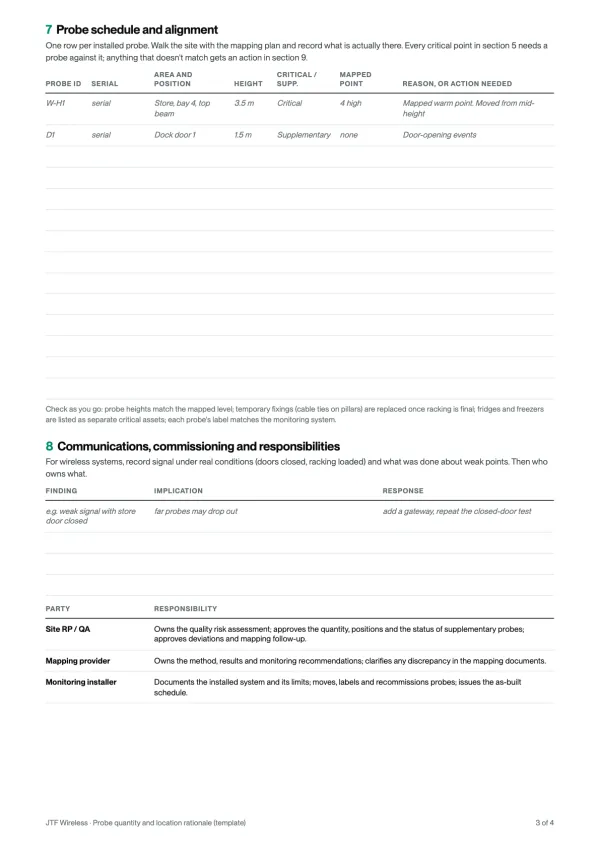
- Alignment, probe by probe: does a probe sit at each critical point? Note doors and docks, HVAC influence, height and temporary fixings.
- Communications: wireless signal under real conditions (doors closed, racking full).
- Responsibilities: you own the risk assessment, the mapping provider owns the results, the installer owns the as-built record.
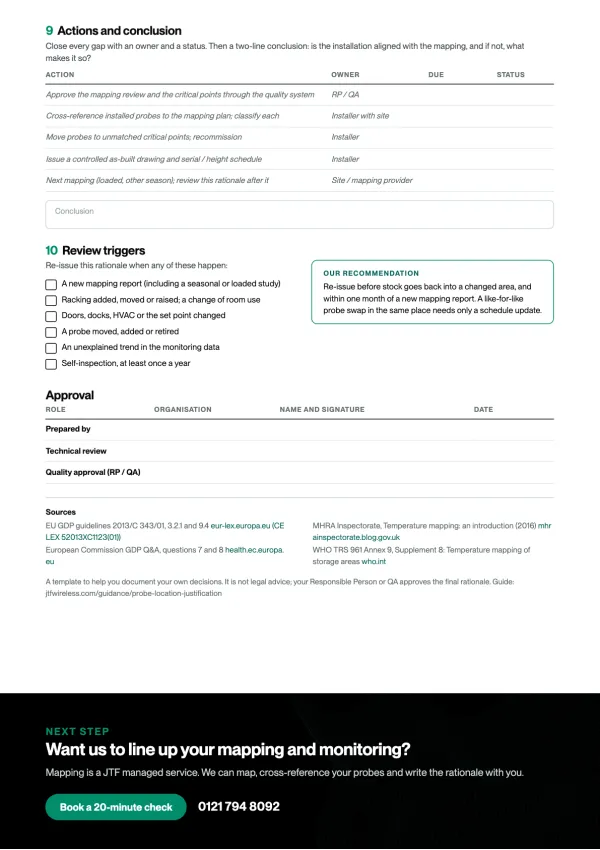
- Actions and review triggers: relocations, an as-built schedule, re-tests, the next mapping, and what makes you re-justify.
- Approval: prepared, technically reviewed and approved by the RP or QA.
Worked example
Twenty-two probes installed, eight mapped points
Based on a real retrospective rationale for a GDP-licensed pharmaceutical warehouse; the site, layout and numbers are changed. The store is 15 to 25 °C: a secure store with storage to about 3.7 m, and an open warehouse with two dock doors.
What happened. The monitoring had to go live while the mapping study was still running. With the RP, the team installed 22 probes for broad coverage: 14 in the secure store at high and low level, 8 in the warehouse at mid-height. The mapping report arrived later and recommended a minimum of 8 critical points: two high and two low in each area.
What the rationale found. 22 exceeds 8, but the installation was not yet aligned. In the secure store the heights were right, but no record tied a probe serial to each mapped position. In the warehouse every probe was at mid-height, so none covered the mapped high and low points. The probes at the docks, goods out and the store door were sensible, but supplementary. The study was run empty, with air conditioning started part-way through, so the critical points stay provisional until a loaded winter study.
What they did. Moved four warehouse probes to the mapped high and low points, cross-referenced the secure store probes to the mapping plan, labelled 8 as critical and 14 as supplementary, fitted a gateway after a closed-door signal test, kept the top racking level out of use, and issued an as-built schedule for the RP to approve. No new probes were bought.
- Critical: at a mapped hot or cold point
- Supplementary: operational risk or coverage
- Old mid-height position, moved
| Probe | Where | Height | Role | Why it is there |
|---|---|---|---|---|
| S-H1, S-H2 | Secure store, wall opposite the AC | 3.5 m | Critical | Mapped warm points under the ceiling, furthest from the air conditioning outlet |
| S-L1, S-L2 | Secure store, floor level near the AC | 0.2 m | Critical | Mapped cool points at floor level, below the air conditioning airflow |
| W-H1, W-H2 | Warehouse, top of racking | High | Critical (moved) | Mapped warm points under the roof; the probes were at mid-height |
| W-L1, W-L2 | Warehouse, near the docks | Low | Critical (moved) | Mapped cool points by the dock doors; the probes were at mid-height |
| D1, D2 | Dock doors | Mid | Supplementary | Door-opening events; not a substitute for W-L1 and W-L2 |
| GO, SD | Goods out, secure store door | Mid | Supplementary | Handling areas and the store interface |
| 10 others | Secure store, spread | High and low | Supplementary | Representative coverage and redundancy, kept by the RP’s decision |
When they don't match
Reconcile, don't rewrite history
If your monitoring and your mapping disagree, the fix is usually moving and relabelling, not buying more. In order:
- Get the final mapping report and its numbered plan, and the heights of every logger.
- Walk the site with the plan and record each probe's serial, position and height.
- Match a probe to every critical point. Where none matches, move one and recommission it.
- Classify every other probe as supplementary, with its reason, or retire it through change control.
- For probes added since the original mapping, link each to its own basis: change control, equipment qualification, a change of room use or a later study. If none exists, say so and raise one.
- Re-test alarms and communications at the new positions, issue the as-built schedule and get RP or QA approval.
How we help
Part of our mapping service
Temperature mapping is a JTF managed service, and the report ends with recommended probe positions. Where monitoring is already installed, we cross-reference it to the mapping and write the rationale with you, including retrospective rationales like the example above. Your RP or QA still approves it. See temperature mapping or use the template yourself.
In summary
The short version
- Monitoring goes where mapping found the extremes; the number follows your risk analysis.
- Put one critical probe at each mapped hot and cold spot, at the height it was found.
- Classify every other probe as supplementary, with a reason.
- If monitoring came first, write the chronology honestly and reconcile probe by probe.
- Give later additions their own basis: change control, qualification or a later study.
- Keep a probe schedule with serials, positions and heights, approved by the RP or QA.
- Re-justify after layout, door, HVAC or set-point changes and after every new mapping report.