Wireless data logging makes you audit-ready by recording every monitored unit automatically, keeping alarms and corrective actions alongside the readings, and letting you export any period's records when an auditor asks. Preparation stops being an event and becomes a report.
Whether you answer to an MHRA inspector, a UKAS assessor, a BRCGS auditor or a customer's quality team, environmental monitoring is one area they consistently look at. This article covers what they ask for, why manual records make that hard, and how wireless logging keeps the evidence ready.
What auditors ask for
The questions are similar across sectors:
- Temperature records for a given unit and period, often several months.
- Every excursion in that period, and what was done about it.
- Proof that alarms work and reach a person, including out of hours.
- Calibration certificates for the sensors that produced the records.
- Who has access to the system, and an audit trail of changes.
- Evidence that sensors are where the risk is, usually from a mapping study.
The problem with manual records
Paper logs and spreadsheets make each of those questions harder. Logs go missing, spreadsheets go out of date, readings are skipped on busy days, and a twice-daily check says nothing about the hours in between. When an auditor asks for six months of data, the scramble begins.
Often the practice on the ground is fine and the evidence is not. A gap in the record is still a gap, however good the fridge was.
Paper also makes the follow-through hard to show. The reading might be on one sheet, the note about moving stock on another and the engineer's visit in an email. An auditor following one excursion from start to finish has to piece it together, and every missing piece becomes a question.
How wireless logging keeps you ready
1. Automatic, protected records
Sensors record at a set interval and send the readings to the cloud. There is no handwriting and no manual upload, and readings cannot be edited without a trace in the audit trail. If an auditor asks about a specific day, time or unit, it is there.
2. History on request
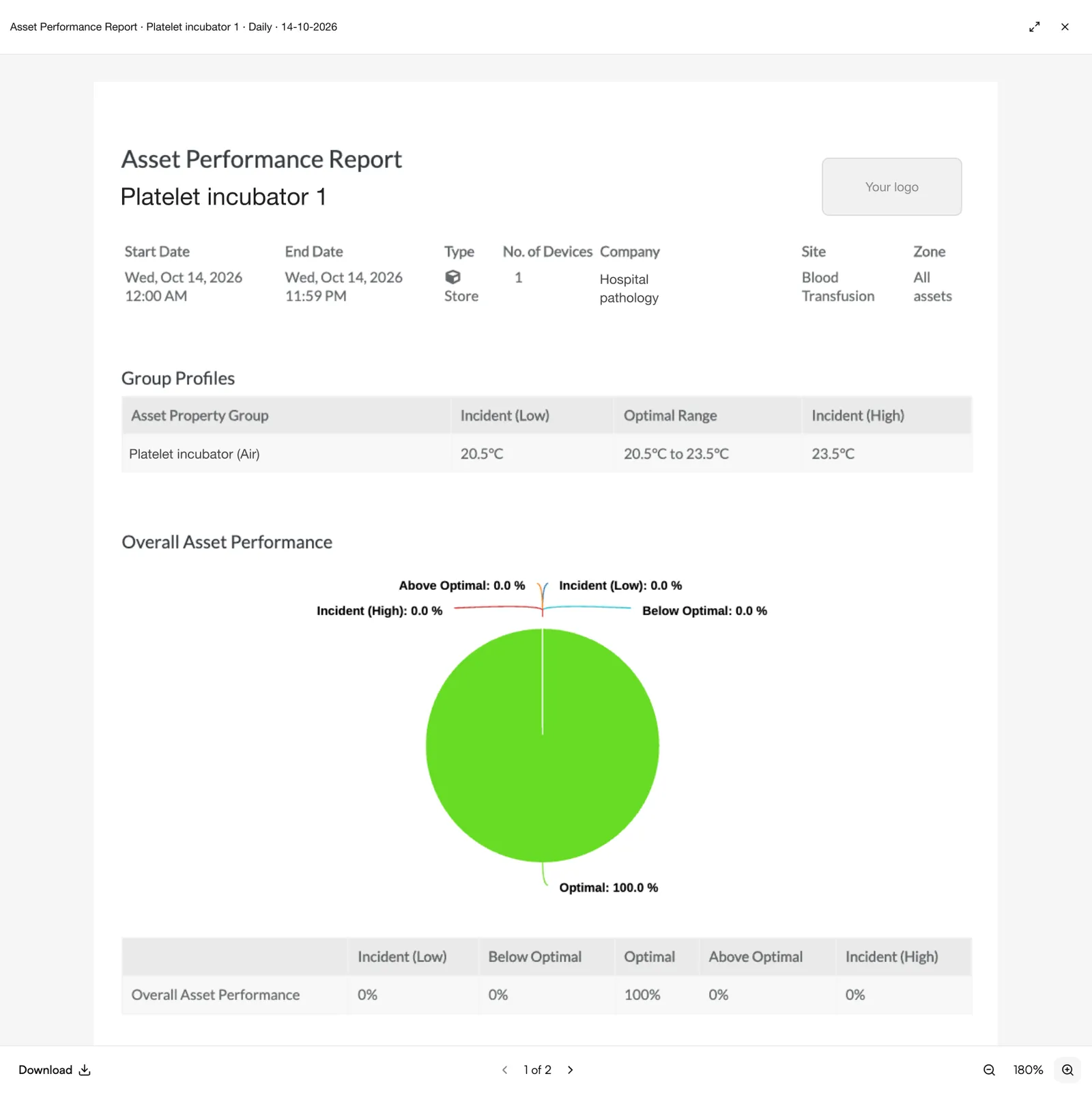
Instead of digging through folders, teams export what is asked for: temperature histories, excursion logs, alarm records and calibration certificates, filtered by site, unit and period. See alarms and reporting.
3. Alarms that leave a record
When a unit drifts out of range, the alarm goes out by SMS, phone call, email or app and escalates until someone acknowledges. The acknowledgement, the comment and the corrective action are recorded with a name and time, which is exactly the trail an auditor wants to follow.
- Request"Show me the vaccine fridge records for March to August."
- FilterSelect the site, the unit and the period.
- ExportTemperature history with every alarm, acknowledgement and comment.
- CertificatesCalibration certificates for the sensor, attached to the same record.
Illustrative. Each step pulls from records the system already holds.
4. Calibration and device status in view
Calibration due dates, device status and battery health are tracked against each sensor, so an overdue calibration or a missing certificate shows up before the auditor finds it. JTF provides calibration for every sensor we supply: traceable to national standards as standard, or UKAS accredited where you need it (temperature in our own UKAS accredited calibration laboratory No. 10723, accredited to ISO/IEC 17025; other parameters through accredited partners). See calibration.
Proof of process, not just data
Auditors don't only want accurate readings; they want to see your process working. Wireless logging gives you continuous evidence, records protected by an audit trail, clear deviation logs and sign-offs, so the process shows in the record. Weekly checks can be signed off in the system too, so the human checks sit alongside the automatic ones.
At Wye Valley NHS Trust, the blood transfusion team shows assessors and inspectors the Sematics record at every visit. In their words:
“They always come and they always look at the Sematics system and they're always happy with what we do.”
Read the full Wye Valley NHS Trust case study.
Why it matters
Audit readiness is no longer seasonal. Inspections can be short-notice, customer audits arrive on their own timetable, and expectations of electronic records keep rising. A system that records in the background keeps your team on the work rather than the paperwork.
Logging does not pass an audit for you: your procedures, training and response do that. What it does is make sure that when the auditor asks, the evidence is complete and in one place. For how the records themselves should stand up, see data integrity in pharma monitoring.
Questions people ask
How far back can we produce records?
As far back as your monitoring system holds them. Set the retention period to match the longest requirement you work to, and check you can export the oldest records, not just the recent ones.
Do auditors accept electronic records?
Yes, provided the system is controlled: readings attributable to a sensor, changes recorded in an audit trail, access limited to authorised users and the records available on request. For GMP computerised systems, Annex 11 sets out what is expected.
What happens during an annual calibration visit?
A JTF engineer calibrates the sensors, replaces batteries where needed, checks the installation and issues certificates, which are held against each sensor. Temperature calibration is done in our UKAS accredited calibration laboratory No. 10723 (accredited to ISO/IEC 17025); other parameters go through accredited partners.
Can manual checks be recorded in the same system?
Yes. Weekly checks and sign-offs can be completed in Sematics, so the human checks your procedure requires sit alongside the automatic readings in one record.